Documentation Home Page ◇ HYPERSIM Home Page
Pour la documentation en FRANÇAIS, utilisez l'outil de traduction de votre navigateur Chrome, Edge ou Safari. Voir un exemple.

TestView Command | General | Eval
- Sylvain Ménard
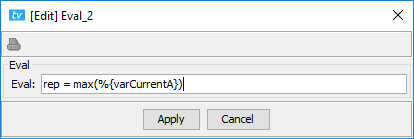
This command is used to calculate only one mathematical expression and save its result in a variable (which is necessary as some other commands can't evaluate expressions). It can also be used to initialize variables (which is necessary for other commands to work).
This command uses the ScopeView calculation engine, meaning that it is possible to use the functions from ScopeView (e.g. ‘max’). For all intent and purposes, ‘Eval’, ‘Expression’ and ‘Assign’ yield the same result, the only difference is the visual presentation of the dialog box and the capability to process one or more expressions.
Differences:
| Eval | Can only evaluate one expression. |
| Expression | Can evaluate several expressions. |
| Assign | Can evaluate several expressions and has the ‘multi-param’ mode. |
OPAL-RT TECHNOLOGIES, Inc. | 1751, rue Richardson, bureau 1060 | Montréal, Québec Canada H3K 1G6 | opal-rt.com | +1 514-935-2323
Follow OPAL-RT: LinkedIn | Facebook | YouTube | X/Twitter